Home»Products»Easy2Sync for Outlook»OverviewWebsite updated: Apr 18, 2024
Compatible
 | to Windows 11, 10, 8.1, 7, Vista, 2003 (All combinations) Outlook 2021, 2019, 2016, 2013, 2010, 2007, 2003, 2000 Intel/AMD, not ARM, not One/Monarch Exchange, Microsoft 365 (Office 365) (All combinations) |
Customer Rating
1103 ratings for Easy2Sync for Outlook with an average of 4.66:

References
Boeing, IBM, Intel, Microsoft & NASA are using Easy2Sync.
More >
“Hi, firstly, I would like to extend my thanks for producing a first class piece of software.”
Paul Fisher, IMAtechie UK
“I just want to say that I have been looking for a program to do this for over two years now and I am so excited to finally have something that works. This is fantastic! Thank you for creating this program!”
Tracey Miles
More >
More >
“Hi, firstly, I would like to extend my thanks for producing a first class piece of software.”
Paul Fisher, IMAtechie UK
“I just want to say that I have been looking for a program to do this for over two years now and I am so excited to finally have something that works. This is fantastic! Thank you for creating this program!”
Tracey Miles
More >

Outlook Team-Calendar
If you have multiple PCs in your office and want to have a common calendar, you can simply limit the Outlook synchronization to your calendar. This way, all of your coworkers will have the same calendar items that you have. If you want, you can exclude your private calendar information from the synchronization.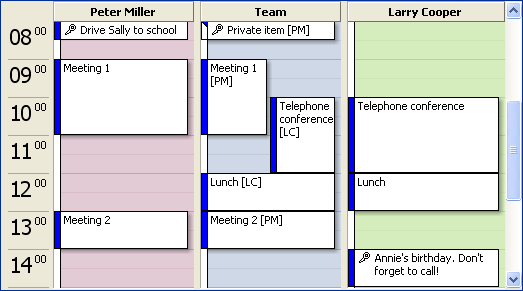
Image: Two calendars merged into a team calendar
Features demonstrated in the image above:
Easily sync your Outlook calendar
Once installed the synchronization can be entirely automatic or in special cases (that you choose) it can ask you for confirmation. You're working with the calendar and Easy2Sync for Outlook does the rest. It automatically recognizes when calendar item was changed where and transfers the change.
Your private Outlook calendar items
Your private calendar items shouldn't show up in the team calendar. With Easy2Sync for Outlook you can exclude them from the synchronization. And the other way round, you can also exclude business appointments when synchronizing with your private notebook.
Taming oversized Outlook calendars
Calendars grow over time and can contains thousands of items. Much more than your cell phone can store. You can use Easy2Sync for Outlook as a bridge between the 2 devices. Easy2Sync for Outlook can create a synchronous copy, which only contains the current appointments. They'll use much less space and will fit into your handheld (Note: Easy2Sync for Outlook synchronizes only PCs and filters by object age, if required. For the sync between the PC and the handheld, please use the software you got with the device.)
Outlook appointments by category
Outlook allows you to assign categories to all calendar items. You can use these in Easy2Sync for Outlook as filter, too. For example to create a central holiday calendar. Only calendar items marked with the category "Holiday" will be synchronized in and out that calendar.
BTW: If your contact folders have different names (Contacts, Contactos, Kontakte, My Contacts, ...), that's no problem either.
<< Back to Outlook synchronize (General)
 Download the Freeware Edition now »
 License the Business Edition now »
Sync Outlook ·
Synchronize Files ·
Sitemap ·
PAD ·
EULA · Uninstall · Mobile version ·
© 1999-2024 ITSTH