Home»Products»Easy2Sync for Outlook»OverviewWebsite updated: Apr 18, 2024
Compatible
 | to Windows 11, 10, 8.1, 7, Vista, 2003 (All combinations) Outlook 2021, 2019, 2016, 2013, 2010, 2007, 2003, 2000 Intel/AMD, not ARM, not One/Monarch Exchange, Microsoft 365 (Office 365) (All combinations) |
Customer Rating
1103 ratings for Easy2Sync for Outlook with an average of 4.66:

References
Boeing, IBM, Intel, Microsoft & NASA are using Easy2Sync.
More >
“Hi, firstly, I would like to extend my thanks for producing a first class piece of software.”
Paul Fisher, IMAtechie UK
“I just want to say that I have been looking for a program to do this for over two years now and I am so excited to finally have something that works. This is fantastic! Thank you for creating this program!”
Tracey Miles
More >
More >
“Hi, firstly, I would like to extend my thanks for producing a first class piece of software.”
Paul Fisher, IMAtechie UK
“I just want to say that I have been looking for a program to do this for over two years now and I am so excited to finally have something that works. This is fantastic! Thank you for creating this program!”
Tracey Miles
More >

Duplicate E-Mails: a) Simple solution
We have a dedicated program to delete duplicates. Yes, it's not free, but it's worth it. It's simpler to use, faster, can merge duplicates, has a 1-click mode and undo.Try 1-Click Duplicate Delete for Outlook.
Duplicate E-Mails: b) Free solution
Do you have duplicate e-mails on your PC? Or all contacts twice? No problem, Easy2Sync for Outlook can find and delete duplicate Objects in Outlook. For free.Remove duplicates - Really for free?
Yes, really. If you want to remove all duplicates on your system, the Freeware Edition of Easy2Sync for Outlook is all you need (Download). Only if you want to use the additional mail, contact, etc. synchronization features, you'll need one of the better editions (comparison here).
How do I do it?
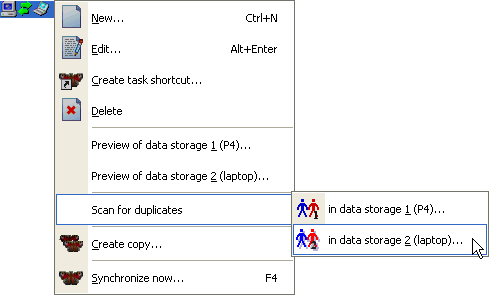
To scan your mailbox for duplicates simply install the Freeware Edition, create a new task (like you wanted to synchronize - doesn't matter what you select as second data storage), but don't start the synchronization. Instead, right-click the task:
Free? Thanks!
If you like our software, please recommend it to your friends, or place a link on your homepage.
If that's not enough...
If the duplicate scanner in Easy2Sync for Outlook isn't enough, we're offering a separate program, which was made only to find and delete duplicate in Outlook. This does cost a (very) few bucks, but for that it recognizes similar objects, merges contacts, is faster and easier to use. Info here.
<< Back to Outlook synchronize (General)
 Download the Freeware Edition now »
 License the Business Edition now »
Sync Outlook ·
Synchronize Files ·
Sitemap ·
PAD ·
EULA · Uninstall · Mobile version ·
© 1999-2024 ITSTH